
How to Remove Line Breaks in HTML, CSS & JavaScript
Line breaks behave differently at every layer of the web stack: HTML collapses them, CSS controls whether they show, and JavaScript can delete them from strings entirely. This guide covers all three layers with patterns you can paste into production code.
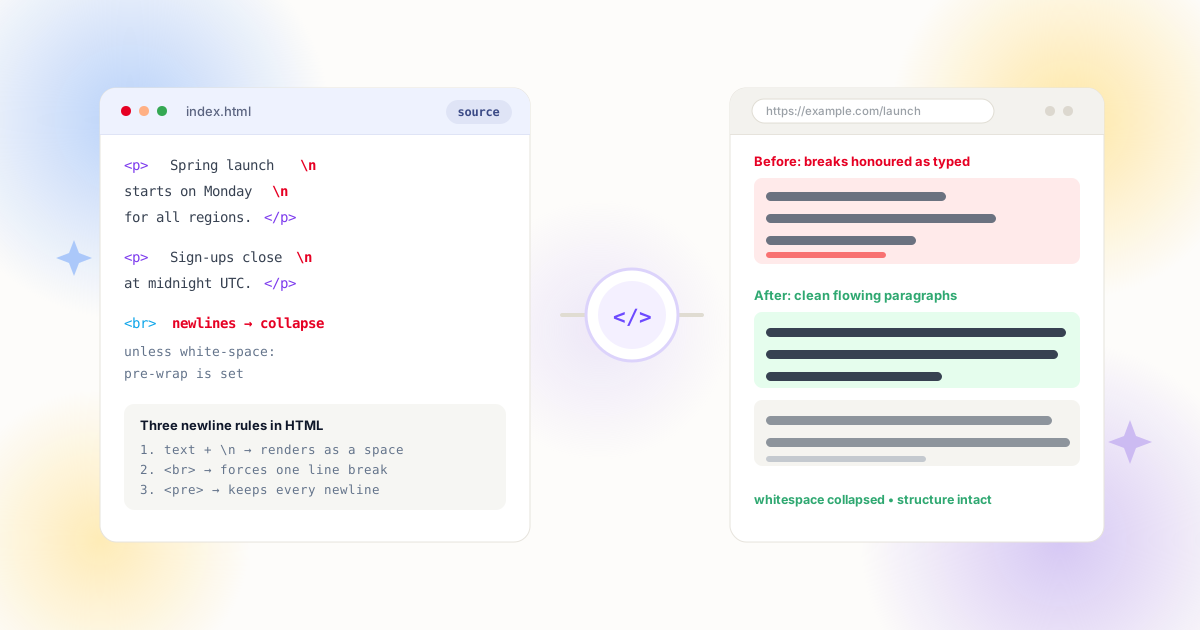
<br>, and preserved verbatim inside <pre>.The Three Layers of Line Break Handling
Before changing anything, identify which layer owns the break you are seeing. The stored newline, the rendered break, and the transformed string are three separate problems with three separate fixes.
HTML owns the source: newline characters inside your markup, template output, or CMS field. Per the newline convention, these arrive as LF or CRLF characters, and the browser's whitespace collapsing rules decide what happens to them. CSS owns presentation: the white-space property can preserve or neutralize breaks visually, but it never edits the underlying text. JavaScript owns transformation: it is the only layer that can actually delete newline characters from a string before they reach the DOM.
The practical rule: if the break should never exist, remove it in the string layer — at build time, at paste time, or at render time with a replace call. If the break exists in source but should not show, CSS handles it. If the break must show, you want a real <br> element or a preserved newline, not an invisible character doing implicit work.
HTML: Where Newlines Live and Why They Break Layout
In plain HTML text nodes, a newline is just whitespace. The browser converts runs of whitespace — spaces, tabs, newlines — into a single space when rendering, which is why your neatly wrapped source code displays as continuous prose. The problems appear when that default is overridden or when breaks sit somewhere whitespace rules do not apply:
- pre and textarea elements preserve every newline by default. Content pasted into a
<textarea>keeps its line structure exactly, which is correct for code but wrong for prose forms. - white-space CSS set to
pre,pre-wrap, orpre-lineon any element re-enables newline preservation — a single inherited rule can make invisible source breaks visible again. - Attribute values cannot contain literal newlines in HTML source; they must be written as
entities or removed before rendering. - Inline SVG and script text treat newlines as significant, so breaks inside them can shift content or break minification.
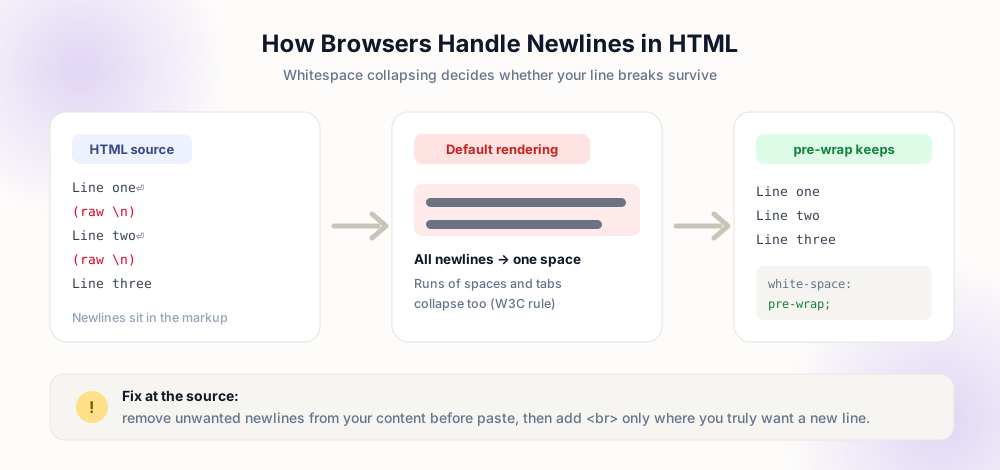
white-space: pre-wrap keeps them visible — useful for code blocks, dangerous for pasted prose.When you paste content into a rich text editor that emits HTML, the editor usually converts each source newline into a <br> tag — Mailchimp, WordPress's Classic Editor, and most helpdesk composers do this. That is why cleaned text matters before paste: a newline that becomes a break tag stays in the exported HTML forever. Our email cleanup guide covers that pipeline in detail.
CSS: Control Rendering Without Touching the Source
CSS cannot delete a newline character, but the white-space property — documented on MDN — controls exactly how the browser treats it. Choose the value that matches your content:
| Value | Newlines | Spaces & Tabs | Text Wraps | Use For |
|---|---|---|---|---|
| normal | Collapse to spaces | Collapse to one space | Yes | Default body copy — stray breaks never show |
| nowrap | Collapse to spaces | Collapse to one space | No | Single-line labels; risky for long text |
| pre | Preserve | Preserve | No | Code blocks exactly as typed |
| pre-wrap | Preserve | Preserve | Yes | Code with soft wrapping |
| pre-line | Preserve | Collapse | Yes | Social posts where breaks matter but spacing does not |
The everyday fix for "my pasted text shows ugly breaks" is confirming the container uses normal. The everyday fix for "my source is clean but breaks keep appearing" is the opposite: something set pre-wrap — check inherited styles on contenteditable regions and code-adjacent components first. Remember that CSS only masks the problem: screen readers and copy-paste from the page still carry the original newline characters, which is why cleaning the string remains the robust answer.
JavaScript: Remove Newlines from Strings
JavaScript's global replace is the canonical tool. Each pattern below solves a slightly different version of the problem — pick the row that matches your data:
| Pattern | Effect | Paragraphs Safe? | Best For |
|---|---|---|---|
str.replace(/\n/g, " ") | Every newline becomes a space | No | Titles, labels, single-field values |
str.replace(/\r\n|\r|\n/g, " ") | Same, handling Windows and old-Mac endings | No | Files from mixed sources |
str.replace(/(?<!\n)\n(?!\n)/g, " ") | Removes single breaks only | Yes | Article and email body copy |
str.replace(/\n/g, "") | Deletes newlines with no space | No | IDs, tokens, concatenated chunks |
str.split(/\r?\n/).join(" ") | Splits lines, rejoins with spaces | No | Legacy engines without replaceAll |
Two modern conveniences round this out. String.prototype.replaceAll makes the intent explicit when the pattern is a plain character, and regex lookbehind support — standard in every current browser and Node since version nine — makes the paragraph-safe pattern portable. For markup that arrives as HTML rather than a plain string, strip tags only after normalizing whitespace, or you will re-introduce breaks at the tag boundaries. And when the string is JSON-bound, remember the newlines travel as escaped \n sequences — covered in the developer section of our AI text cleanup guide, with the full parse-then-edit workflow in the JSON cleanup guide.
Before and After in Code
A wrapped string entering a render function, and the same string after a paragraph-safe replace:
Quarterly revenue grew
across every region
except APAC.

Guidance for next
quarter stays unchanged.
Quarterly revenue grew across every region except APAC.

Guidance for next quarter stays unchanged.
One call produced the second value, and the paragraph gap survived because the lookaround skipped it. If your pipeline runs in a browser-based tool rather than code, our Preserve Paragraphs tool applies the identical rule before you paste into any CMS.
Where Stray Breaks Enter a Web Pipeline
Cleanup is cheapest at the entry point. These are the four places newline noise typically sneaks into production content, each with the matching defense:
| Entry Point | What Arrives | Defense |
|---|---|---|
| CMS / admin paste | Wrapped prose from PDFs, docs, or chat | Clean before paste, or normalize on save with a paragraph-safe replace |
| API response strings | Escaped \n inside JSON values | Normalize after parse, before render — see the AI cleanup guide |
| CSV-backed content | Embedded newlines inside quoted fields | Flatten fields on import — see the CSV cleanup guide |
| Rich text export | <br> tags converted from source newlines | Strip breaks in the source string; tags never get created |
Build-time minifiers do not help here — HTML minifiers collapse whitespace between tags but leave newlines inside meaningful text untouched, and JS minifiers preserve string contents by definition. The only reliable normalization happens in your own code or your own paste workflow. For text that reaches a page from editors and spreadsheets, the companion guides on CSV fields and Google Docs cover those sources directly.
User Input: Newlines You Must Keep (and Newlines You Must Strip)
Everything above concerns text you control. Text coming from users is a different contract: a textarea is specifically designed to carry line breaks, and stripping them on arrival destroys the user's formatting. The rule that separates the two cases is whether the newline is data the user typed on purpose or structure that leaked in from a paste.
In practice, keep user breaks in free-text fields — comments, messages, review bodies — and store them exactly, normalizing only the flavor: convert CRLF to \n on the server so your database holds one consistent form. Strip or collapse breaks in structured fields — names, phone numbers, URLs, tags — where a newline is never intentional but frequently arrives via copy-paste from a signature or a document. The MDN whitespace reference catalogs every character that counts as invisible structure, including the tab and non-breaking space variants that often travel alongside pasted newlines.
| Field | Newlines | Normalization |
|---|---|---|
| Comment / message body | Keep | CRLF → LF, trim edges, cap consecutive breaks |
| Name, email, phone | Strip | Replace with empty string or space, then trim |
| Single-line input fields | Strip | Join with space — a pasted multi-line value still submits |
| Address block | Keep or flatten | Depends on whether the consumer parses multi-line addresses |
| Search query | Strip | Collapse to single spaces — queries are never multi-line |
Two implementation notes. First, do the stripping on submit or on the server, not on every keystroke — live coercion fights the user while they are still typing a paste. Second, escape before rendering: a newline itself is harmless in HTML, but the paste that carried it may have carried angle brackets too. Strip or escape the dangerous characters, normalize the whitespace, and let CSS decide what the surviving structure looks like. The white-space property documentation remains the final authority on how whatever you stored will appear.
Developer Checklist
- Decide the layer first. Rendering glitch → CSS. Stored characters → JavaScript or content pipeline. Wrong element semantics → use a real
<br>instead of a newline. - Normalize all three newline flavors with
\r\n|\r|\nwhen input can come from Windows uploads, Unix servers, or old files. - Choose remove-vs-space deliberately. Spaces preserve word boundaries; no-space fusion is only safe for tokens and identifiers.
- Verify the textarea and pre cases after any whitespace change — they are the elements most likely to re-expose hidden breaks.
- Test copy-paste from your rendered page. If users copy broken lines out of your site, the stored string still contains the newlines — clean it at the source.
Frequently Asked Questions
How do I remove line breaks in HTML?
str.replace(/\n/g, " ") in JavaScript, or a paragraph-safe cleanup in your CMS before the HTML is generated.Can I remove line breaks with CSS alone?
white-space: normal already folds newlines into spaces. If your element uses pre or pre-wrap and you do not need preserved breaks, switch it back to normal — the newline characters remain in the DOM, but they stop affecting layout.How do I remove line breaks from a JavaScript string but keep paragraphs?
str.replace(/(?<!\n)\n(?!\n)/g, " "). It matches only newlines that are not adjacent to another newline, so blank-line paragraph boundaries are skipped while every mid-sentence wrap becomes a space.Why do line breaks show on my website but not in my editor?
pre or textarea tag, or a white-space rule of pre/pre-wrap applied directly or inherited. Inspect the computed style, restore normal, or remove the newlines from the underlying string.What is the difference between a newline character and a br tag?
<br> is an explicit line-break element that always renders. Removing newline characters from your string does not remove existing <br> tags — if an editor converted pasted newlines into break tags, strip those in the HTML itself or clean the source before the conversion happens.Explore Related Tools & Tutorials
Line Break Remover →
Test your cleanup visually — paste, compare modes, and copy production-ready strings.
ExplainerLine Breaks vs. Paragraph Breaks →
\n versus \n\n in every environment — HTML, Word, plain text, and code.
GuideRemove Line Breaks in Notepad++ →
The same regex patterns, applied directly to files on disk.
GuideRemove Line Breaks in Python →
Server-side cleanup with splitlines, re.sub, and the csv module.
GuideRemove Line Breaks in Markdown →
Soft wraps, hard breaks and paragraphs — which newlines Markdown lets you remove.
GuideRemove Line Breaks in VS Code →
Join Lines, scoped regex and multi-cursor — the editor-side workflow.
Data FormatsRemove Line Breaks from JSON →
Escaped \n values, formatting whitespace and parse errors — the full breakdown.
Backend GuideRemove Line Breaks in PHP →
Sanitize form inputs, textarea strings, and line endings with str_replace and preg_replace.
Backend & EnterpriseRemove Line Breaks in Java →
Backend string normalization with String.replace(), regex, and streams.