
How to Remove Line Breaks in Java (String.replace, Regex & Streams)
Java hands you four ways to take a newline out of text, and the wrong one either leaves stray carriage returns or quietly flattens every paragraph in the file. This guide covers the literal path, the regex path, the streaming path, and how to know which one your input actually needs.
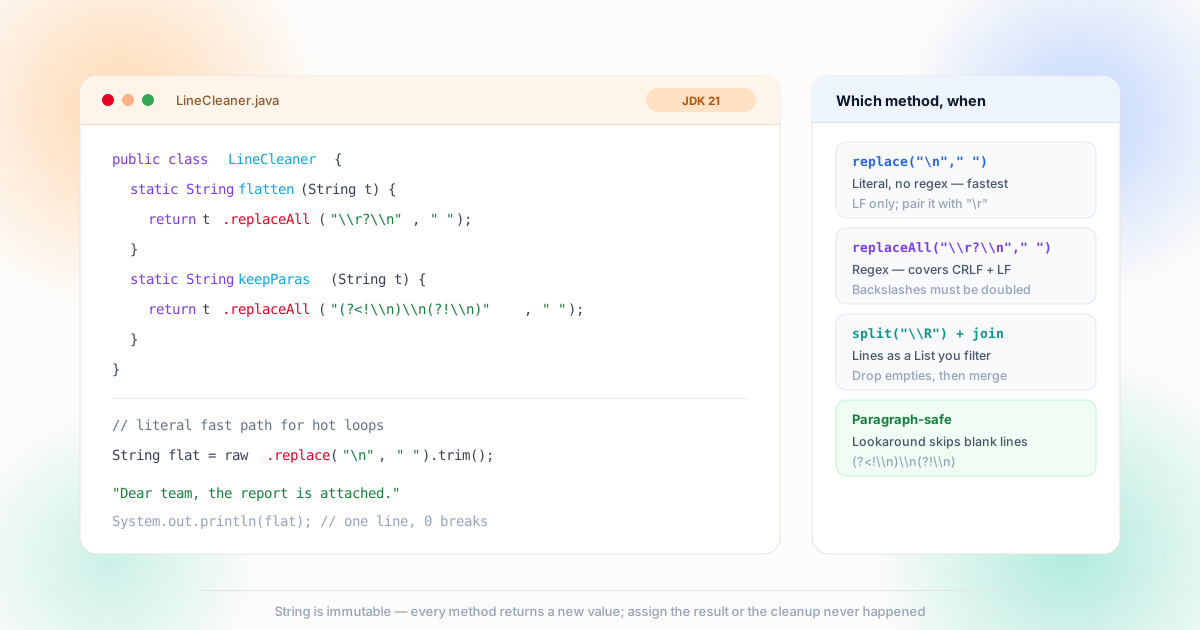
replace is a literal search, replaceAll compiles a regex — and neither result means anything until it is assigned back, because String never changes in place.The Newline Is Two Characters, Not One
The single most common Java newline bug is not a wrong method — it is a pattern that matches half of a Windows line ending and leaves the other half behind.
In a Java source literal, '\n' is line feed (character 10) and '\r' is carriage return (character 13). Text produced on Windows carries both, in that order, as "\r\n"; text from Unix systems and most Java APIs carries a bare '\n'. If your input came from a file you did not write, treat the ending as unknown and match both. The newline character set behind LF, CR and CRLF is the same one every other platform handles — the difference in Java is only that you must spell the pattern yourself. The full method contracts live in the String API documentation, and the regex syntax used below is defined by java.util.regex.Pattern.
There is a second, structural question layered on top: which newlines are you allowed to remove? In prose, a single newline is usually a wrap that should be joined, while a blank line marks a paragraph that must survive. That split — and why a blanket replace is wrong for documents — is covered in depth in the line breaks vs paragraph breaks article. Everything below assumes you already know which of the two cleanup modes your text needs.
Unix LF
Bare '\n' — the default of most Java writers and Linux-produced files. Simplest case.
Windows CRLF
"\r\n" pairs from files, exports and legacy systems. Match the pair or keep a stray \r.
Unicode breaks
U+2028, U+2029 and U+0085 from PDF extractors — invisible until a validation fails. Regex \R catches them.
PDF splits
Real breaks plus hyphenated words cut mid-token. Newline join is necessary but not sufficient here.
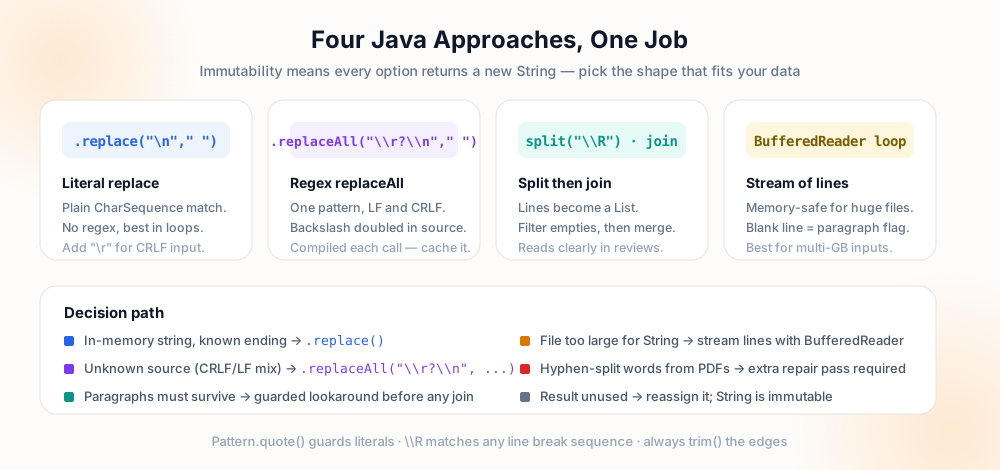
Method 1: Literal replace for Known Input
When you control the input — a constant string, an API that documents its line ending, a field you already normalized — use String.replace. It takes plain characters, performs no regex compilation, and reads cleanly in hot loops: text.replace('\n', ' ') for LF, or two chained calls when CRLF is possible. For string arguments the behavior is identical, so text.replace("\r\n", " ").replace("\n", " ") is the belt-and-braces form.
The critical Java-specific detail: String is immutable. Every one of these methods returns a new value and discards the old one if you do not assign it. A line that reads text.replace('\n', ' '); with no assignment compiles, runs, and changes nothing — one of the quietest bugs in this category. The same trap applies to trim() and strip(); the checklist at the end covers it.
String text = "line1\nline2";
text.replace("\n", " ");
System.out.println(text);
// line1
// line2 ← unchangedString text = "line1\nline2";
text = text.replace("\n", " ");
System.out.println(text);
// line1 line2 ✓Method 2: replaceAll When the Input Is Unknown
String.replaceAll treats its first argument as a regular expression, which buys you expressiveness. The canonical unknown-input pattern is "\\r?\\\n" — note the doubled backslashes: inside a Java string literal the regex engine must still see \r and \n, so the source needs \\ to survive one round of unescaping. That single pattern handles both CRLF and LF.
For paragraph-safe joins, add lookarounds: "(?<!\\n)\\n(?!\\n)" matches a newline only when it is not next to another one. Java's regex engine supports both lookbehind and lookahead, and the pattern behaves exactly as the equivalent expression does in the Notepad++ guide and the Python guide — only the escaping changes. Two performance notes: replaceAll recompiles the pattern on every call, so extract it to a private static final Pattern if the method runs in a loop; and if you are matching fixed literal text that happens to contain metacharacters, Pattern.quote() wraps it safely.
Method 3: Stream the File Instead of Loading It
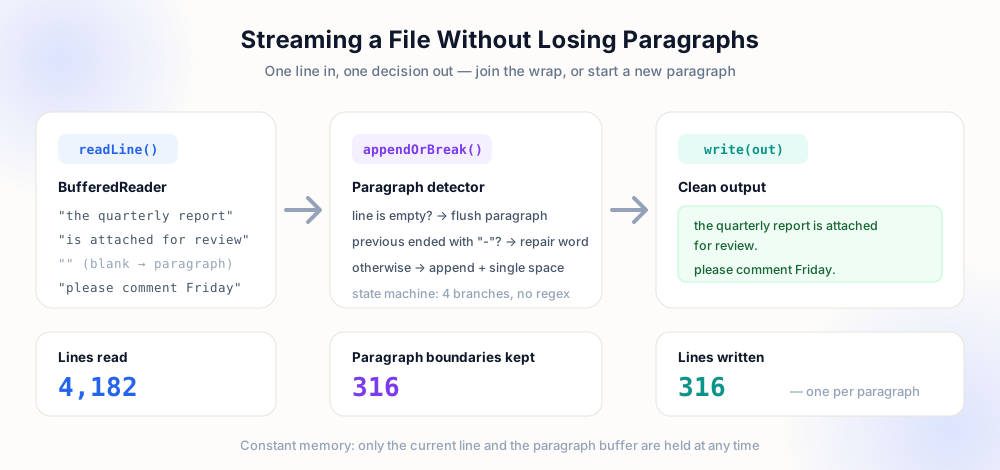
Reading a whole file into a String is fine until it is not. Past a few hundred megabytes, the approach stops being a style choice and starts being an outage. The streaming alternative is a BufferedReader wrapped around a Files.newBufferedReader(path), read line by line into a StringBuilder, flushing the buffer whenever an empty line arrives.
The streaming form has a second advantage beyond memory: the reader already did the newline splitting for you. You no longer match newline characters at all — you decide, per line, whether to append it (with a space) or to flush a paragraph. Blank lines become an explicit signal instead of a regex edge case, which makes the paragraph logic obvious to anyone reading the code later. When the source is a PDF rather than a plain text file, add the hyphen-repair step from our PDF cleanup guide between lines — the join alone leaves words like "report-" and "ing" glued incorrectly.
There is also a pure-library path for small jobs: Files.readString(path) followed by the guarded replaceAll, then Files.writeString. For anything you would run repeatedly on real-world inputs, the line-stream version wins on both memory and clarity. And when the text is destined for a database column or a CSV field rather than another file, the destination's rules take over — the field-level guidance in the CSV guide applies unchanged.
Choosing the Right Approach
The decision takes four questions: how big is the input, do you know its line ending, does structure need to survive, and what is the destination?
| Situation | Approach | Watch out for |
|---|---|---|
| Known LF string, small | replace('\n', ' ') | Assign the result |
| Unknown line endings | replaceAll("\\r?\n", " ") | Doubled backslashes |
| Paragraphs must survive | Guarded lookaround pattern | Keep blank-line runs intact |
| File larger than heap | BufferedReader line stream | Use try-with-resources |
| Text copied from PDF | Hyphen repair + join | Split words are not wraps |
| Hot loop, millions of rows | Literal replace or cached Pattern | Do not recompile per call |
Notice the shape of the table: size selects the memory strategy, origin selects the pattern, and destination selects how aggressive the join may be. The same three-way split organizes every language-specific article on this site, from the PowerShell guide to the JavaScript coverage in our web development article — the syntax changes, the decision does not.
Testing the Cleanup Before It Ships
Text transformation code is deceptively easy to write and deceptively easy to get subtly wrong, because a plausible-looking result can still have lost a paragraph, doubled a space, or dropped a carriage return into the middle of a name. The protection is a test that asserts structure rather than appearance. A test that only checks the output contains a familiar phrase will pass on a result that silently destroyed every blank line in the document.
@Test
void joinsLines() {
    String out = clean(input);
    assertTrue(out.contains("Dear team"));
}@Test
void keepsParagraphsWhileJoining() {
String out = clean(input);
assertEquals(3, out.split("\n\n", -1).length);
assertEquals(countWords(input), countWords(out));
assertFalse(out.contains("\r"));
}The right-hand test encodes three properties that every cleanup should keep. The paragraph count is preserved, so blank-line boundaries survived the join. The word count is identical, so nothing was merged into a single token or dropped at an edge. And no carriage return remains, which catches the classic mistake of matching only \n on Windows-authored input. Add a fixture that exercises CRLF, a lone LF, a run of blank lines, leading indentation, and an emoji with a surrogate pair, and the suite covers the inputs that actually arrive rather than the input you imagined when writing the method.
Fixtures deserve the same care as assertions. Check a sample file into the test resources rather than building strings inline for anything longer than a line — inline strings tend to be normalised by the editor that writes them, and the test then verifies the editor's line endings instead of the ones you meant to study. Reading the fixture with an explicit charset keeps the build identical across machines, and asserting the fixture's own line endings at the start of the test turns a broken repository setting into a clear failure instead of a mystery.
The fixture list maps directly onto the method table above: a tiny string for the literal replace, a paragraph with blank lines for the guarded Pattern, a file larger than the comfortable heap for the stream path, and a passage copied from a PDF for the hyphen-repair branch. Once the properties hold for all four, the refactor that swaps a regex for a streaming reader cannot regress silently — the word count and paragraph count tests will fail first. The JUnit 5 user guide covers the assertions used here, and the same three properties translate to any framework: the discipline is language-independent, exactly as the Python guide and the PowerShell guide argue from their own runtimes.
Pre-Commit Checklist
- Result assigned — every
replace,replaceAll,trimandstripcall is captured back into a variable. - Both line endings covered — the pattern tolerates CRLF, LF, and ideally Unicode separators from exotic sources.
- Paragraph mode verified — a sample with blank lines renders with the same paragraph count after cleanup.
- Pattern not recompiled — repeated
replaceAllcalls use astatic final Patternconstant. - Streams closed — readers use try-with-resources so file handles are released on every path.
- Encoding explicit —
Files.readString(path, UTF_8)rather than relying on the platform default.
Frequently Asked Questions
How do I remove line breaks from a String in Java?
text.replace('\n', ' ') for literal LF input, or text.replaceAll("\\r?\n", " ") when the line ending is unknown. Both return a new string — assign the result, otherwise nothing changes.What is the difference between replace and replaceAll?
replace matches literal text and does no regex work, so it is faster and needs no escaping. replaceAll compiles a regular expression, letting you write patterns like "optional CR plus LF", but backslashes must be doubled in the Java literal.How do I keep paragraphs intact while joining lines?
(?<!\n)\n(?!\n) as the replaceAll argument. It only joins newlines that are not adjacent to another newline, so blank-line paragraph boundaries pass through untouched.How do I handle files larger than memory?
BufferedReader: read line by line, append to a StringBuilder, and flush on empty lines. Memory stays constant, and blank lines arrive as an explicit paragraph signal instead of a regex edge case.Why are stray characters left after the replace?
"\r\n" first or use "\\r?\n" so both characters are consumed in one pass — and if the text came from a PDF, add a hyphen-repair pass for split words.Explore Related Tools & Tutorials
Remove Line Breaks in Python →
re.sub, splitlines and pandas equivalents of every method on this page.
Web DevelopmentHTML, CSS & JavaScript Breaks →
The browser-side half of the same problem: white-space and string joins.
GuidesClean Up Text Copied from PDF →
When joining lines is only step one — hyphen repair and paragraph detection.
ToolPreserve Paragraphs Cleaner →
Test your pattern against real text before you wire it into production code.