
Remove Line Breaks in Markdown: Soft Wraps, Hard Breaks & Paragraphs
Markdown stores meaning in its line breaks — and also stores meaningless ones. Joining lines the wrong way destroys hard breaks and paragraph structure; joining them the right way removes visual clutter without a single pixel of layout change. The difference is knowing which newline is which.
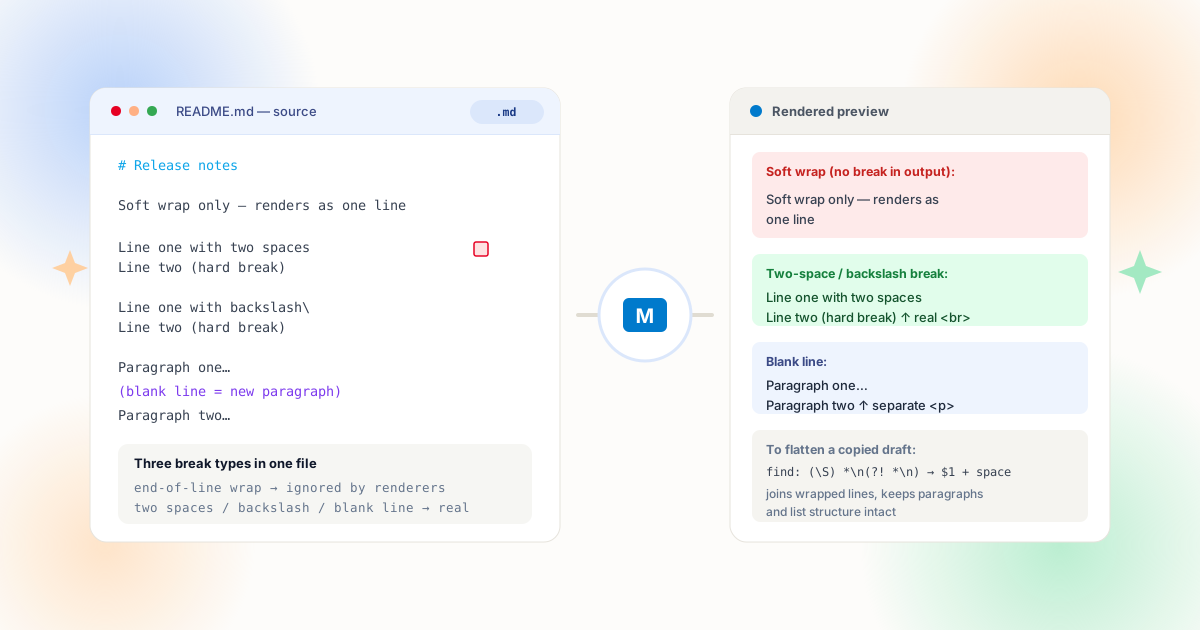
The Three Newlines Inside One Paragraph
Plain-text formats encode line structure with the newline character, and Markdown assigns meaning to every position where one appears. Get the classification wrong and cleanup becomes destruction.
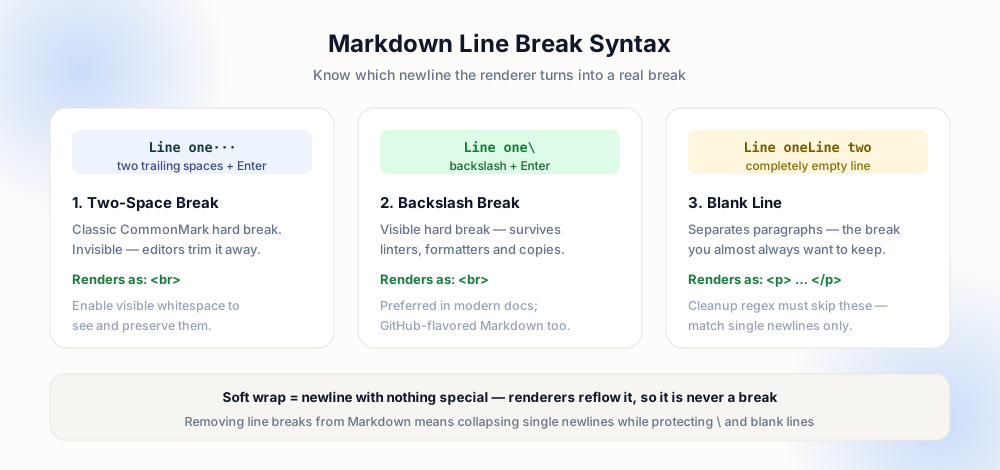
A soft wrap is a newline in the middle of a paragraph with nothing special around it. Renderers reflow soft wraps to the reader's viewport — the same file looks different on a phone and a widescreen monitor — so the newline carries no meaning. Long lines that were hard-wrapped at eighty columns by an author or a tool are all soft wraps. A hard break is a newline the author marked deliberately: end the line with two trailing spaces, or with a backslash, and the renderer emits a real break. A blank line separates paragraphs entirely; it becomes a paragraph element in the output. The CommonMark specification defines all three behaviors precisely — softbreak, hard break, and paragraph interruption — and any tool claiming Markdown compatibility implements exactly this model.
"Remove line breaks from Markdown" therefore cannot mean "replace every newline with a space." That single-minded replace flattens headings into paragraph text, erases list structure, kills hard breaks, and glues paragraphs into walls of text. The correct operation is narrower: join soft wraps, keep hard breaks, keep blank lines, and leave block structure alone. Everything below is a different technique for expressing that one sentence.
Soft Wrap
Plain newline mid-paragraph. Reflows at render time — removing it changes nothing visually, which is why it is always safe to join.
Hard Break
Two trailing spaces or a backslash before the newline. Renders as an explicit line break — part of the design, never collateral.
Paragraph Gap
An empty line between blocks. Starts a new paragraph element — the boundary that paragraph-safe cleanup exists to protect.
Block Structure
Headings, list items, code fences, tables. Their line breaks are syntax — join them and the document stops parsing.
Method 1: The Paragraph-Safe Regex
The surgical tool is a newline match with two guards: do not match when the previous line ends in a hard-break marker, and do not match when the next line is blank. In any regex-capable editor — VS Code, Notepad++, Google Docs — the pattern below does the job:
(?<! )\n(?! ) extended: match a newline whose preceding characters are not two spaces or a backslash, and whose following character is not another newline. Replace with a single space. Lines that ended with a hard-break marker are skipped automatically, paragraph gaps are skipped automatically, and every plain wrap joins with exactly one space — no fused words, no double spaces.
A simpler variant works when your document has no hard breaks at all: match .*\n lines that are not blank and join them — but the guarded pattern above never has to be swapped out, which is why it is the one worth memorizing. For documents where you actually want to delete hard breaks rather than keep them (converting a fixed layout into flowing text), flip the guard: match newlines preceded by two spaces first, replace them and the spaces with a single space, then join the remaining soft wraps in a second pass.
Method 2: Let a Formatter Decide
If your project uses Prettier, the proseWrap option already answers this question declaratively. Set it to never and the formatter joins every soft-wrapped paragraph into long lines (preserving hard breaks and structure); set it to always and it re-wraps every paragraph at the print width; preserve leaves line decisions untouched. One config field, applied consistently across every file in the repository — no ad-hoc regex runs.
Linters enforce the policy in CI. markdownlint's line-length rule (MD013) flags lines beyond a configured budget, and its trailing-spaces rule (MD009) can be configured to allow exactly two trailing spaces — the hard-break marker — while still catching stray whitespace. The Prettier proseWrap documentation lists the three modes with examples; choosing one and documenting it in CONTRIBUTING ends the "my editor re-wrapped your paragraph" review debate permanently. Within VS Code, the format-on-save action plus these settings means cleanup becomes a property of the toolchain rather than a task you remember to do — see the VS Code guide for the keybindings involved.
# Release notes

Line one
Line two

Next para

→ "# Release notes Line one
Line two Next para"
(headings and paragraphs gone)
# Release notes

Line one Line two

Next para

→ structure identical,
wraps flattened only
Method 3: Clean on the Way In
Much Markdown cleanup is imported rather than authored. Content generated by AI tools arrives soft-wrapped at odd widths with markdown noise baked in; text pasted from documents brings paragraph structure that was never Markdown at all; README fragments copied from chats carry the hard breaks discussed in our chat messages guide. Cleaning at the point of entry — before the text lands in your file — removes the need to repair the file later.
The workflow is the same every time: paste into a cleaner that distinguishes soft wraps from paragraphs, confirm the preview shows joined paragraphs and intact structure, then paste into the document. For AI output specifically, the model can be asked to emit paragraphs instead of one-line-per-sentence fragments — the prevention-first approach from the AI text cleanup guide applies directly, since Markdown is that output's native format. And when entire repositories need consistent line discipline, the batch guide extends the same rules across folders.
Block Types Your Cleanup Must Never Touch
Beyond the three newline types, whole block constructs depend on their line breaks as syntax. This table is the mental model to run before every replace:
| Block | Newlines | Safe cleanup |
|---|---|---|
| Paragraph | Soft wraps joinable | Join single newlines; keep blank-line ends |
| ATX heading (#) | Trailing newline ends it | Never join a heading to following text |
| List item | Item starts at marker | Join continuation lines inside an item only |
| Code fence | Every newline is data | Exclude fenced regions from any replace |
| Table | One row per line | Never join rows; cells keep their pipes |
| Blockquote (>) | Markers optional per line | Join only inside one quoted paragraph |
Notice the pattern: body text is flexible, syntax is not. That asymmetry is why paragraph-safe regex uses lookarounds instead of a plain replace — it encodes "body text only" into the pattern itself. Editors with Markdown-aware folding (VS Code's built-in preview at Ctrl+Shift+V, or a side-by-side preview) let you verify visually after the run: if the rendered output is byte-identical except for reflow, the cleanup was correct.
Recipe: Re-Flowing a Hard-Wrapped README
A concrete case ties the theory together. A colleague's README was hard-wrapped at eighty columns by their terminal editor: every paragraph is eight short lines, headings are fine, a code fence holds a shell example, and two paragraphs use backslash hard breaks for deliberate line poetry in an example. The goal is to re-flow paragraphs into long lines for the web version without disturbing anything else.
Step 1 — inventory the structure. Open the rendered preview side by side with the source and note what must survive: three headings, one fenced block, two backslash breaks, four blank-line paragraph boundaries, one bullet list. That list becomes the acceptance test — after cleanup, the preview must be identical except for line lengths in body paragraphs.
Step 2 — choose the transformation. Because the document uses backslash hard breaks (visible ones), the join pattern only needs two guards: do not match a newline preceded by a backslash, and do not match when the following line is blank. Excluding the fenced region — via a selection-scoped replace, or by temporarily breaking the fence pair if the editor cannot scope regex — protects the code sample's newlines, which are content. Running the replace joins body wraps with single spaces while the inventory list stays untouched.
Step 3 — verify against the acceptance test. Re-render and compare: headings intact, code sample byte-identical, backslash breaks still breaking, paragraphs still separate, list items still listed — only body lines are longer. Diff review in version control shows changes confined to paragraph interiors, which is exactly what a reviewer expects to see. Then commit the formatter setting alongside the change (proseWrap: never, or the team's chosen policy) so the next edit does not re-wrap what this pass just settled. The lint gate from earlier keeps future contributions inside the same rules; one pass, one policy, no relitigating in pull requests.
The same recipe scales down to a single paragraph pasted from an AI draft — the AI cleanup guide applies it constantly — and scales up to a documentation site through the batch workflows in the batch article. The invariant never changes: classify each newline, join the meaningless ones, preserve the meaningful ones, verify visually before you commit.
Pre-Cleanup Checklist
- Blank lines protected — paragraph gaps use a lookahead, a placeholder pass, or a formatter configured to preserve them.
- Hard breaks identified — you know whether the document uses two-space or backslash breaks, and the pattern respects them.
- Code fences excluded — fenced and indented code blocks are skipped; their newlines are content, not layout.
- Lists and tables intact — the rendered preview shows the same items, rows, and headings as before.
- One policy per repo — proseWrap or markdownlint settings document the line discipline so the next edit does not undo this one.
Frequently Asked Questions
How do I remove line breaks without changing the layout?
What is the difference between a soft wrap and a hard break?
Why did my two-space line breaks disappear?
Can Prettier or markdownlint handle this automatically?
How do I flatten copied Markdown from an AI tool?
Explore Related Tools & Tutorials
Remove Line Breaks in VS Code →
Run these patterns where you edit — join lines, scoped regex, multi-cursor.
GuideClean Line Breaks from AI Text →
Markdown noise and newline fragments in generated content, handled together.
ToolPreserve Paragraphs Cleaner →
The paragraph-safe join, previewable before you paste it back.
ConceptsLine Breaks vs Paragraph Breaks →
The character-level theory behind every pattern in this article.
Technical WritingLaTeX & Academic Papers →
Compare Markdown soft wraps with LaTeX paragraph breaks and double slashes.
Frontmatter & ConfigYAML Multiline Strings →
How Markdown document frontmatter interprets folded and literal string blocks.