
How to Remove Line Breaks from JSON Strings & Files (Without Breaking Data)
A JSON file contains three different kinds of newline, and only one of them is noise. Remove the wrong one and you corrupt a value; remove none and the payload stays bloated. This guide tells them apart and gives you the workflow that keeps the document valid at every step.
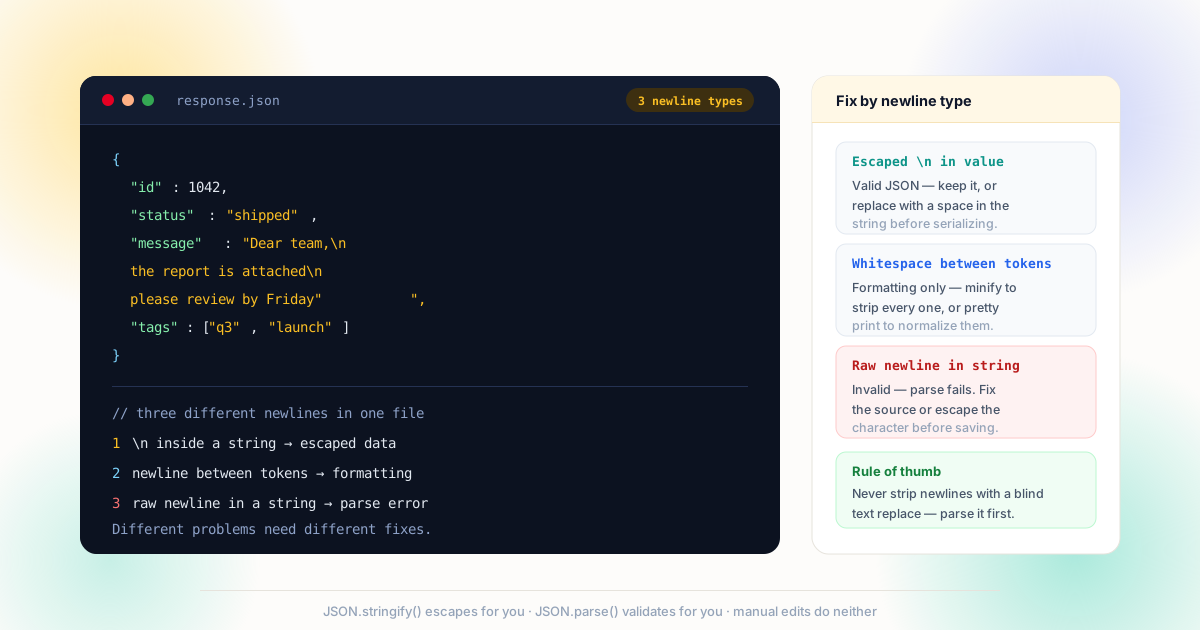
\n inside a string is data, newlines between tokens are formatting, and a raw newline inside a string is a parse error waiting to happen.The Three Newlines Inside One JSON File
JSON's grammar is deliberately strict about where newlines may appear, and that strictness is exactly why a generic "remove line breaks" command fails on it.
The first kind is formatting whitespace: the newlines and indentation between tokens that make a file readable. The JSON specification and its IETF form, RFC 8259, allow any amount of whitespace between structural characters — so these newlines carry zero information and can be removed or added freely. The second kind is escaped newlines inside string values: the two characters \ and n that the parser converts back to a real line feed when it reads the string. Those are data. Removing them changes the content of the message, the address, the log line. The third kind is a raw newline character inside a string — a line break your editor inserted when you pressed Enter. JSON forbids it outright: the parse fails, and every tool downstream reports the same unhelpful error at the same column.
Classifying which one you are looking at is the entire job. It is the same discipline the line breaks vs paragraph breaks article teaches for prose, applied to a machine format: structure, content, and accident are three different things wearing the same character. The AI text cleanup guide hits this exact issue when generated payloads arrive with newlines baked into fields, and the fix there is the same as the fix here.
Formatting whitespace
Newlines between tokens. Pure presentation — minify freely, pretty-print freely, never a data question.
Escaped in a value
The two characters \n inside a string — becomes a real line break when parsed. This is content.
Raw in a value
A literal newline character inside quotes. Invalid JSON — the document will not parse at all.
CRLF baggage
Windows exports carrying \r\n pairs — must be collapsed together, never half-removed.
Why Find and Replace Fails on JSON
Open a JSON file in an editor, hit replace-all on newline, and three outcomes are possible — none of them good. If you replace the newline character itself, every formatting newline disappears and the file becomes one unreadable line (which happens to still be valid JSON), but any raw newline inside a string is now a space glued into the middle of a word, silently changing data. If you replace the two-character sequence \n, you destroy every intentional line break inside every value — multi-line addresses, message bodies, code snippets. And if your pattern only matched one of the two, you leave carriage returns behind and the file still will not load.
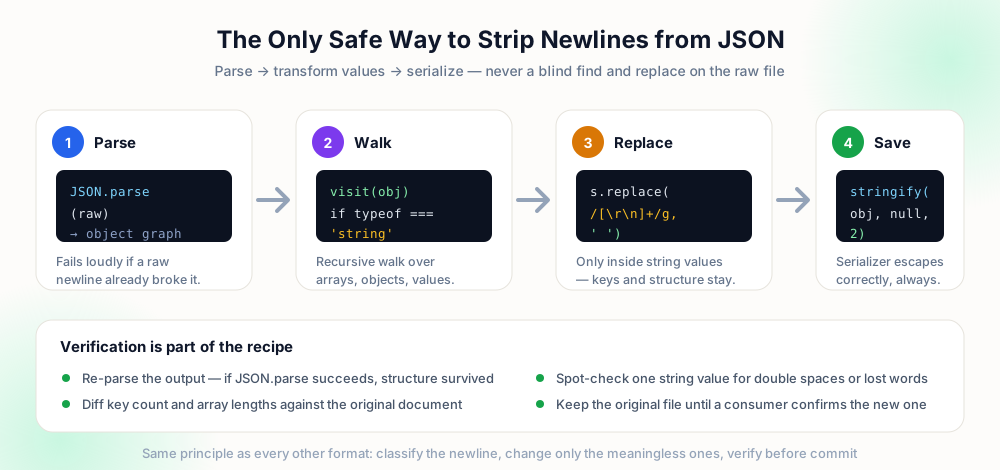
The deeper problem is that text tools operate on characters, while JSON meaning lives in structure. A text replace cannot know that this \n is inside a string and that one is between two tokens. The fix is to work at the level where the meaning exists: parse the document into an object graph first, make your changes in the graph, and let the serializer write the file. Both halves of that loop are documented by MDN — JSON.parse validates and decodes, JSON.stringify re-encodes and escapes. Whatever characters you produce in the middle, the output is structurally correct by construction.
find:    \n
replace: (empty)

"msg": "Hi\nthere"  →  "Hi there"  (data gone)
{ ... }             →  one unreadable line
+ any raw CR left overconst o = JSON.parse(raw); o.msg = o.msg.replace(/[\r\n]+/g, ' '); JSON.stringify(o, null, 2); // structure verified, values edited
When You Want the Newlines Gone from Values
Some pipelines genuinely need single-line values: a database column that rejects line feeds, a CSV field that would split rows, a log line that must stay one record. The operation is still a value-level edit, not a file-level one. After parsing, recurse through the object — arrays and nested objects included — and wherever you find a string, apply the replacement that matches your rules.
Choose the rule by content type. Prose fields get newlines replaced with a space, then consecutive spaces collapsed, then the edges trimmed. Structured fields like phone numbers and codes get every break removed with no space inserted. And fields that are supposed to be multi-line — addresses, message bodies — are skipped entirely unless the destination explicitly forbids breaks. That field-by-field classification is exactly what our CSV and data fields guide prescribes for tabular data; the payload just happens to be nested now. The same caution applies to imports that originate in spreadsheets — see the Excel and Google Sheets guide for how those breaks get created in the first place.
Repairing a JSON File That Already Fails to Parse
When a raw newline has already landed inside a string, no parser will load the file — so the parse-first workflow has a bootstrap problem. The fix is a targeted repair: locate the string containing the break and replace the real line break with the two characters \ and n, which restores validity without changing what the value means when read.
Practically: most editors can show you the offending line — the parser error usually names the line number. Within that string, replace an actual newline with \n (and a carriage return pair with \r\n if the file came from Windows). Save, re-parse, repeat until the document loads. Only then run the value-level cleanup described above, because now the object graph exists to edit. For files produced by an AI tool or a web scraper — the two most common sources of this failure — the prevention-side fixes in the AI cleanup guide and the HTML rendering rules in the HTML, CSS and JavaScript article both stop the break at the source.
| Symptom | Cause | Fix |
|---|---|---|
| Parse error "unexpected token" | Raw newline inside a string | Escape it as \n at the reported line |
| Value lost its line breaks | Blanket replace on \n sequences | Restore from source; edit parsed values only |
| Stray ^M in values | CRLF half-removed | Collapse [\r\n]+ together in one pass |
| File is one huge line | Formatting newlines minified | Already valid — pretty-print for review if wanted |
| Keys contain spaces | Replace ran across structure | Revert; never run text replace on formatted JSON |
| Double spaces in messages | Newline replaced with space over existing space | Collapse /\s{2,}/g to one space in values |
The pattern across every row is identical: diagnose which newline you have, operate at the level where it lives, verify by parsing. It is the same method the Python guide applies with json plus re, and the same one the SQL guide applies inside a transaction — different runtimes, one discipline.
Every Newline Encoding You Will Meet in the Wild
Real files rarely contain only the newline you were expecting. The same document can carry three or four different representations of "a line ended here", and each one demands a different fix. The table below is the triage sheet: what you are looking at, where it came from, and the level at which it should be edited.
| What you see | What it actually is | Where it came from | Correct fix |
|---|---|---|---|
| Newline between tokens | Formatting whitespace | Any pretty-printer or editor | Free to remove or add — re-serialize with JSON.stringify(o) |
| Backslash followed by n | Escaped line feed inside a value | Data itself: messages, addresses, logs | Parse first, edit the string, serialize again |
| Backslash and u 0 0 0 a | Unicode-escaped line feed | Escaping libraries that prefer all-ASCII output | Identical to \n once parsed — treat as data |
| Backslash r backslash n | Escaped carriage return and line feed pair | Windows-authored strings embedded in JSON | Replace the whole pair at once so no lone CR survives |
| A real break inside "quotes" | Raw control character in a string | Hand-edited files and broken exporters | Escape it as \n — the document will not parse until you do |
| Nothing between two documents | Newline-delimited JSON: one complete object per line | Log streams and streaming exporters | Split on newlines, then parse each line separately |
Read the table top to bottom and the shape of the discipline appears. Rows one and six describe structure — whitespace the format defines — and they are handled by the serializer or by splitting the stream, never by a character replace. Rows two through five describe content, and every one of them survives parsing intact: JSON.parse converts the escape back into a real line feed, you edit the resulting string with whatever rule the field requires, and JSON.stringify escapes it again on the way out. The RFC 8259 grammar is what makes the split safe: control characters must be escaped inside strings, which is exactly why the raw break in row five fails to parse in the first place.
The last row deserves a note of its own, because it looks like corruption and is not. Streaming formats deliberately put one complete JSON document per line so consumers can process a firehose without loading the whole file: read a line, parse it, discard it, read the next. The newline is the record separator — removing it merges thousands of records into one invalid document. If you inherit a file that will not parse and the error column points at what looks like the end of an object, check whether you are holding a stream rather than a document before you touch anything. The SQL guide makes the same distinction for row separators, and the CSV guide for field boundaries: when the newline is the delimiter, the newline is the structure.
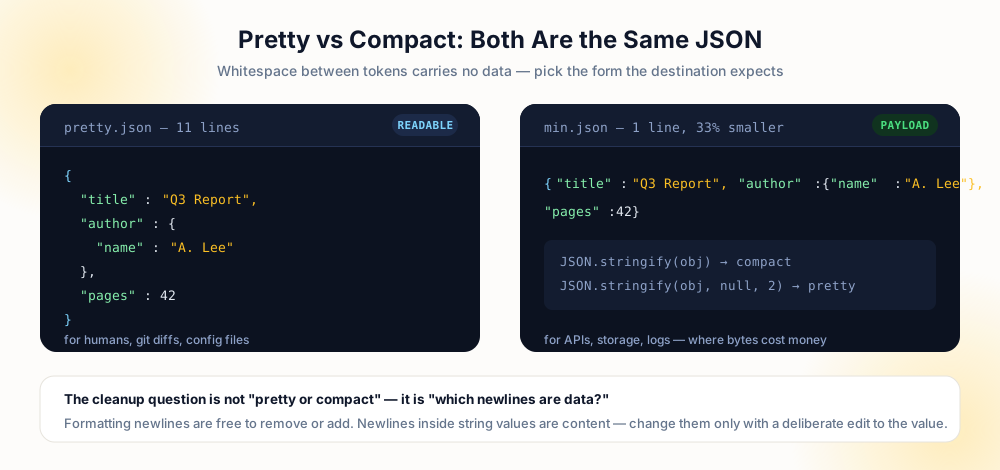
One measurement settles arguments in review: parse the file before and after any change and compare key counts. If the graph is unchanged, every difference is whitespace, and whitespace is a policy decision — pretty for the files humans read, compact for the payloads that ship — rather than a data change.
Pre-Edit Checklist
- Document parses —
JSON.parse(or your language's loader) succeeds before any transformation runs. - Newline type identified — formatting, escaped value, or raw-in-string; the fix differs for each.
- Edits made on the object — changes happen in the parsed graph, never through replace-all on raw text.
- Multi-line fields skipped — addresses and messages keep their breaks unless the destination forbids them.
- Output re-parsed — the serialized result loads again, and key counts match the original.
- Whitespace policy explicit — pretty for files humans read, compact for payloads that ship.
Frequently Asked Questions
How do I remove line breaks from a JSON string value?
JSON.parse, walk the object, and inside string values run a replace such as value.replace(/[\r\n]+/g, ' '). Serialize back with JSON.stringify — the serializer handles escaping, so the output is valid JSON by construction.Why can't I just find and replace in the file?
\n data, and possibly illegal raw newlines. A text replace cannot tell them apart — it corrupts values or leaves parse errors behind. Work on the parsed object instead.What is the difference between pretty and compact JSON?
Why does my JSON stop parsing after I edit it?
\n form. Pressing Enter in an editor inserts the raw character. Escape it as \n (or repair the generator) and parsing resumes.How do I remove all newlines from a whole file?
JSON.stringify(parsed) produces one valid line with no indentation. If you mean values too: walk the parsed graph and clean each string field by your field rules, then serialize. Do both as separate, reviewable steps.Explore Related Tools & Tutorials
CSV & Data Fields →
Field-level newline rules when your JSON feeds a spreadsheet or import.
Web DevelopmentHTML, CSS & JavaScript →
Where the string goes after serialization — rendering and escaping on the web.
AI WorkflowsClean AI-Generated Text →
JSON responses from model APIs are a classic source of baked-in breaks.
ToolPreserve Paragraphs Cleaner →
For the human-readable prose inside the payload, before or after serialization.
Config FormatsYAML Folded & Literal Strings →
Learn multiline string handling in YAML, Kubernetes, and CI/CD pipelines.