← Back to All Tools
🚀 Single-Line Flattener

Remove All Line Breaks

Collapse any multi-line block of text into one continuous string. Ideal for SQL queries, CSV data fields, single-line form inputs, and code strings.

Your text is never uploaded to a server · Nothing is stored · 100% private
Mode:
Batch ModeNew

Separate multiple documents with --- on its own line

Advanced Cleanup Options
Chars
0
Words
0
Lines
0
Chars
0
Words
0
Lines
0
Saved
—
Core Functionality

When and Why You Need to Remove All Line Breaks

While essay writers and readers typically want to preserve paragraphs, software developers, data engineers, and analysts frequently need the exact opposite: complete flattening of text into a single line.

In data processing, unexpected line breaks create chaos. A carriage return inside a CSV column corrupts row counting. A newline in a bash terminal string prematurely executes a command. An unintended line feed in an SQL string triggers syntax errors in database drivers.

Remove All Line Breaks mode searches for every occurrence of Windows CRLF (\r\n), Unix LF (\n), old Mac CR (\r), and Unicode line separators, stripping them completely to yield a monolithic continuous string.
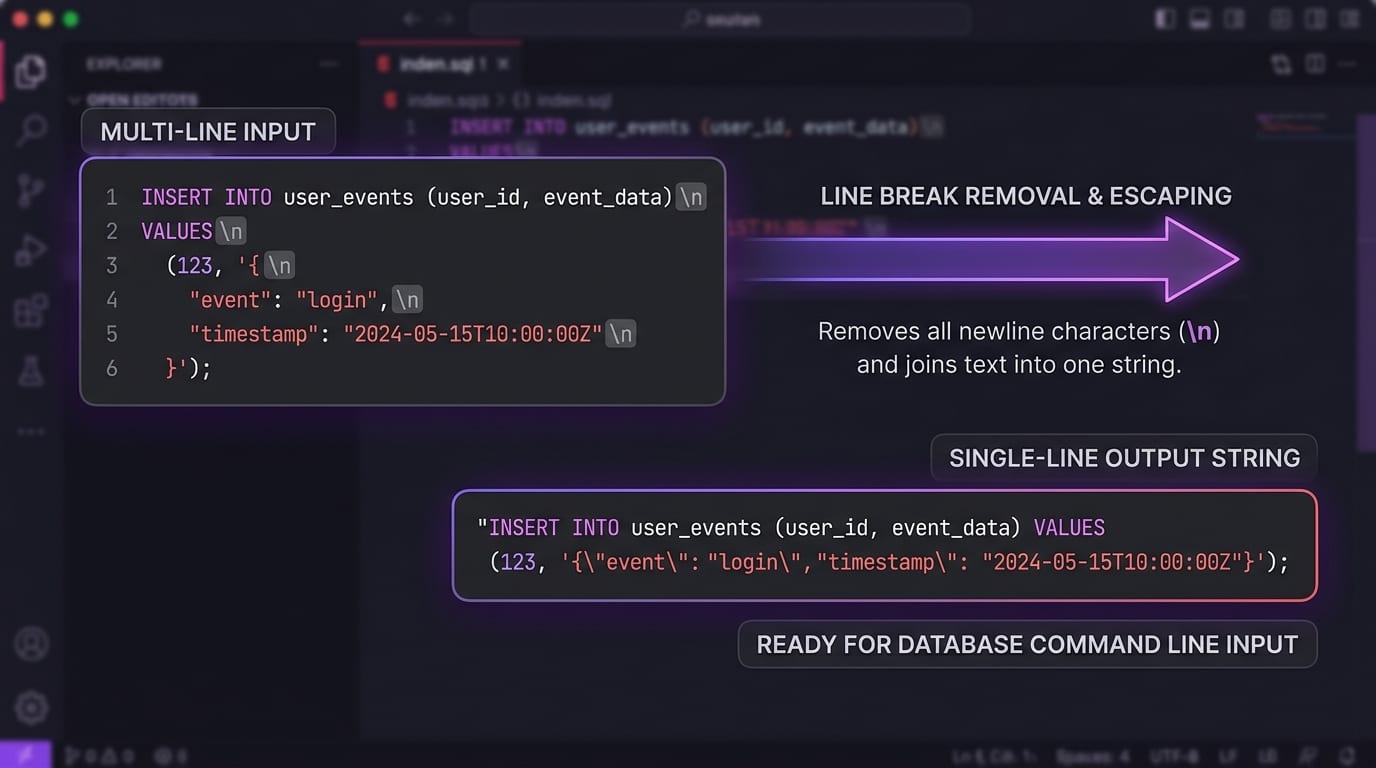
Technical diagram showing multi-line SQL statement and code collapsing into a single-line continuous string
💻Single-Line String Transformation: Converts multi-line SQL clauses and JSON objects into single continuous strings for terminal CLI commands.
Important Choice

"Remove All" vs. "Remove All + Space": Which Should You Use?

The most critical decision when stripping all breaks is whether line endings should be replaced by a space:

Strict Collapse

Remove All (Zero Space)

Directly joins adjacent lines with no added characters. Perfect when lines already have trailing spaces, or when concatenating raw code, base64 strings, or DNA sequences.

Input:
ABC
DEF
Output: ABCDEF
Space Replacement

Remove All + Space

Replaces every newline with a single space. Prevents words from colliding into a single unreadable word (e.g. "hello" and "world" becoming "helloworld").

Input:
Hello
World
Output: Hello World
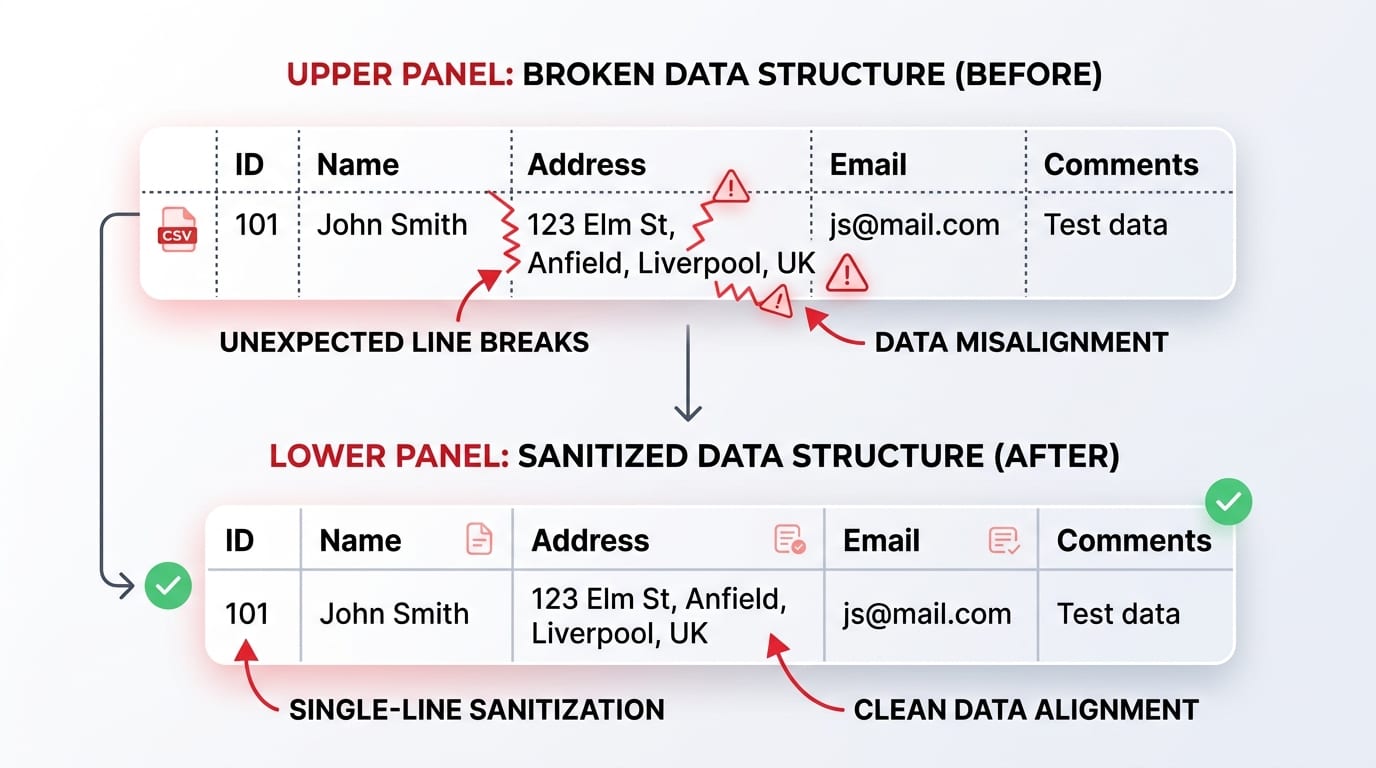
Infographic illustrating CSV data sanitization removing line breaks to prevent column misalignment and row offset
📊CSV Data Normalization: Strips line breaks inside address and comment fields, preventing row offset corruption in spreadsheets.
Feature Matrix

Removal Modes Comparison

Choose the exact mode for your transformation goal:

👉 Mobile Users: Swipe horizontally to view full comparison columns →
ModeHandling of \nOutput LinesBest Applied To
🚀 Remove All
Absolute Flattening
Replaced with empty string ("")1 Single LineBase64, hex dumps, terminal commands, regex strings.
🔄 Remove All + Space
Delimiter Swap
Replaced with single space (" ")1 Single LineProse, SQL queries, multi-line addresses, CSV values.
⭐ Preserve Paragraphs
Smart Mode
Single replaced with space; double keptOriginal ParagraphsEssays, research articles, book manuscripts.
🧠 Smart PDF
Heuristic Scan
De-hyphenates + sentence scanReflowed ProseAcademic PDFs, legal transcripts, OCR scans.
Code Snippets

Developer Cheatsheet: Removing All Line Breaks in Code

Need to remove line breaks programmatically in your own scripts or pipelines? Here are the quickest one-liners across popular languages:

Python
cleaned = "".join(text.splitlines()) # or ' '.join(...) for spaces

See our dedicated guide: How to Remove Line Breaks in Python.

JavaScript / TypeScript
const cleaned = text.replace(/[\r\n]+/g, '');

For web development, check out Line Breaks in HTML, CSS & JavaScript.

SQL (PostgreSQL / MySQL / T-SQL)
SELECT REPLACE(REPLACE(column_name, CHAR(13), ''), CHAR(10), ' ') FROM table;

Learn more in our guide: How to Remove Line Breaks in SQL.

Bash / Linux Terminal
cat input.txt | tr -d '\r\n' > singleline.txt

Windows users can also check PowerShell Line Break Removal.

Standard references: Review IETF RFC 4180 (Common Format and MIME Type for CSV Files) ↗ and ECMAScript Language Specification ↗.

Industry Scenarios

Common Use Cases for Single-Line Text Flattening

💾

Database Queries (SQL)

Database management tools and CLI clients (like psql or mysql) often break when pasting formatted multi-line queries. Flattening the query into one line ensures clean execution.

📊

CSV & Excel Data Preparation

Customer addresses or product descriptions containing newlines corrupt spreadsheet imports. Flattening them into a single string prevents column displacement. Read our CSV Line Break Cleaning Guide.

💻

Terminal & Curl Commands

Pasting multi-line bash or curl scripts can trigger accidental premature execution of lines. Flattening commands with semicolons avoids broken command syntax.

📝

Regex & Search Queries

Regular expression search bars and web form input fields reject newlines. Removing breaks ensures complex regex strings pass through validation filters. Check our VS Code Regex Guide.

Common Questions

Frequently Asked Questions About Removing All Line Breaks

Find answers to the most common technical and operational questions regarding text flattening and newline elimination:

What does Remove All Line Breaks do?+
Remove All Line Breaks strips every newline and carriage return character from your text, collapsing the entire multi-line block into one continuous single-line string without paragraph breaks or gaps.
Will words stick together when all line breaks are stripped?+
In strict 'Remove All' mode, text is joined directly without adding replacement spaces. If your source lines do not have trailing spaces, words at line ends will merge together. To avoid this, use 'Remove All + Space' mode or enable our space replacement feature.
How is Remove All useful for SQL queries and coding?+
Many database command-line interfaces, terminal prompts, and API query parameters require SQL statements to be passed as a single-line string. Remove All strips indentation newlines while preserving inner SQL syntax.
Can I remove all line breaks from CSV data?+
Yes. Embedded newlines inside CSV columns break row parsing in spreadsheet applications like Excel and Google Sheets. This tool collapses multi-line comments and addresses into single-line cells cleanly.
Does this tool work with large files and texts?+
Yes. The tool processes tens of thousands of lines in milliseconds entirely in your local browser using client-side JavaScript. There are no server round-trips or file upload limits.
How do I remove all line breaks in VS Code or code editors?+
In VS Code, press Ctrl+H, turn on regular expressions (Alt+R), search for \r?\n, and replace with an empty string or space. Alternatively, paste into our online tool for instant one-click sanitization.