
How to Remove Line Breaks in SQL (MySQL, PostgreSQL & SQL Server)
A line feed inside a varchar column is invisible until an import rejects it, a search misses it, or a display field renders three rows tall. This guide shows the exact functions each database gives you, and the preview-then-update workflow that keeps a bulk cleanup safe.
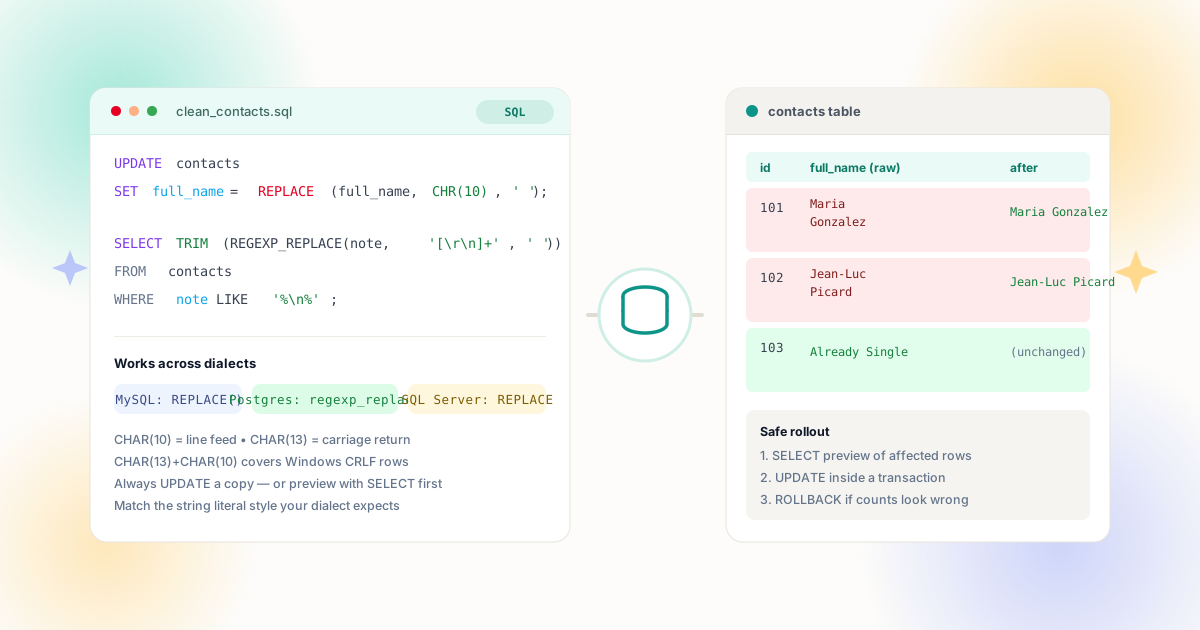
Where Newlines Come From in Database Columns
Databases happily store any character you send them — including the line feed hiding inside a name, phone number, or code field. The newline is almost never typed; it arrives with the data.
The usual suspects follow a pattern. Imports from spreadsheets carry the breaks that formatting created inside cells — the same Alt+Enter problem that breaks CSV files, now persisted into your schema. Web forms with multiline-capable inputs accept pasted addresses and notes with embedded returns, then save them into columns intended to be single-line. API payloads from chat systems, PDF extractors, and legacy exports bring their own line structure along. And once one row has a newline, every downstream process — search indexing, label printing, JSON serialization, regex validation — inherits the surprise.
The repair lives in string functions, and the good news is the concept is identical everywhere: find the character, replace it with something safer, verify the result. Only the spelling changes by dialect. Before touching data, read our CSV and data fields guide for the classification step — deciding which columns may legally keep breaks — because that decision determines how aggressive your SQL should be.
Spreadsheet Imports
Cells formatted across multiple lines export to CSV with their breaks intact, and the import statement stores them verbatim in the target column.
Web Forms & APIs
Textareas, chat messages, and mobile keyboards insert newlines that validation rarely strips before the INSERT.
PDF & OCR Extracts
Text pulled from scanned documents arrives line-by-line, mirroring the printed layout instead of the document's real structure.
Legacy Systems
Fixed-width exports and mainframe feeds sometimes use embedded returns as internal delimiters that were never stripped on migration.
The Two Characters That Matter
A "line break" in stored data is one or two ASCII control characters. CHAR(10) is the line feed (LF, the Unix ending) and CHAR(13) is the carriage return (CR); Windows files store them as the pair CR+LF, which is why a single-character replace sometimes leaves stray ^M artifacts behind. PostgreSQL spells the same values as CHR(10) and CHR(13); MySQL, SQL Server, and Oracle all accept the CHAR() form. CHAR(9), a tab, frequently travels with pasted data and belongs in the same sweep for single-line fields.
| Dialect | Literal approach | Regex approach |
|---|---|---|
| MySQL 8+ | REPLACE(REPLACE(col, CHAR(13), ''), CHAR(10), ' ') | REGEXP_REPLACE(col, '[\\r\\n]+', ' ') |
| PostgreSQL | REPLACE(col, CHR(10), ' ') | regexp_replace(col, '[\\r\\n]+', ' ', 'g') |
| SQL Server | REPLACE(REPLACE(col, CHAR(13), ''), CHAR(10), ' ') | REGEXP_REPLACE on recent versions; nested REPLACE elsewhere |
| Oracle | REPLACE(col, CHR(10), ' ') | REGEXP_REPLACE(col, '[\\r\\n]+', ' ') |
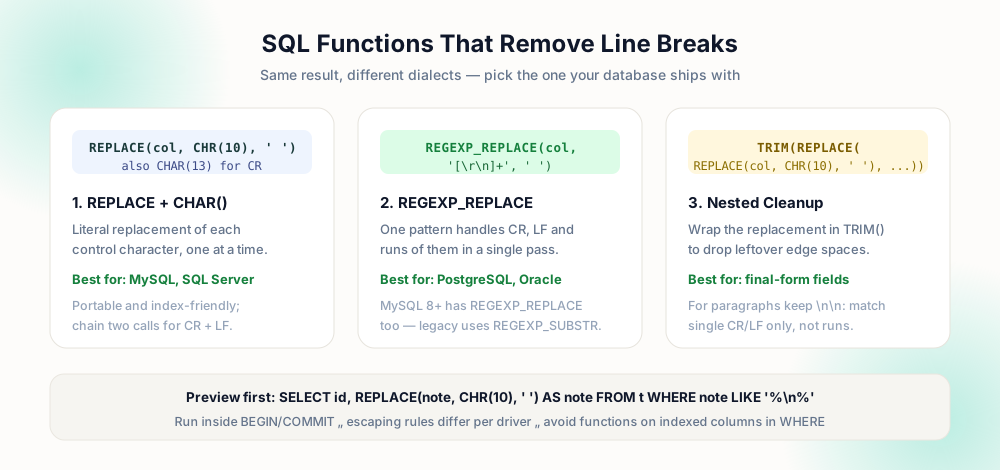
The nesting order in the literal approach matters subtly: removing CR first (empty-string replacement) and converting LF to a space produces clean single-spaced output for CRLF input, because the pair collapses to one space instead of two. If the field should keep no gaps at all, replace both with the empty string — but remember the word-fusion problem from our Python cleanup guide: "call\nMonday" must become "call Monday", never "callMonday".
Preview First: The SELECT That Proves Everything
Never open with UPDATE. Start with a SELECT that answers three questions at once — which rows are affected, what the transformed value looks like, and whether anything you care about is lost:
SELECT id, note AS original, TRIM(REPLACE(note, CHAR(10), ' ')) AS cleaned FROM notes WHERE note LIKE CONCAT('%', CHAR(10), '%');
The WHERE clause counts your baseline — write the number down. The projection shows original and transformed side by side, so a pattern bug (double spaces, fused words, an over-eager replace) is visible in the first ten rows instead of discovered after commit. On SQL Server the LIKE concatenation uses the plus operator instead of CONCAT; on PostgreSQL you can also use strpos(note, CHR(10)) > 0, which is often faster than LIKE with wildcards.
UPDATE notes
SET note = REPLACE(note, CHAR(10), '');
-- 12,431 rows affected
-- "callMonday" now in 208 rows
BEGIN;
UPDATE notes
SET note = TRIM(REPLACE(note, CHAR(10), ' '))
WHERE note LIKE CONCAT('%', CHAR(10), '%');
-- compare count to baseline, then COMMIT
ROLLBACK;  -- if anything looks off
The transaction wrapper is the other half of safety. Run the UPDATE inside BEGIN/COMMIT (or BEGIN TRAN/COMMIT TRAN on SQL Server), compare the reported row count with your baseline, scan a few transformed rows, and only then commit — otherwise roll back and refine the pattern. For tables large enough that a single statement threatens your maintenance window, batch it: loop with LIMIT/keyset pagination on MySQL and PostgreSQL, or update in top-N chunks on SQL Server, committing each batch. Batching also bounds lock duration on hot tables — other sessions keep reading while each small transaction opens and closes, instead of waiting on one statement that rewrites a million rows in a single shot. Note the row-affected count on a batched run should sum back to your baseline; a shortfall means the WHERE predicate and the detection query have drifted apart, and the two must be reconciled before the next batch goes out.
Indexes, Performance and Schema Hygiene
Wrapping a column in REPLACE or REGEXP_REPLACE inside a WHERE clause makes the predicate non-sargable — the index on that column cannot be used, and a table scan follows. That is an argument for doing cleanup once, as data maintenance, rather than decorating every query with a transformation. The pattern that scales:
- Measure. Baseline count with the LIKE predicate; note index size and table statistics.
- Transform once. Transactional UPDATE in batches, converting newline-bearing rows to clean values.
- Validate. Re-run the baseline count — it should drop to zero — and sample rows for fused words or doubled spaces.
- Prevent recurrence. Add a CHECK constraint where the dialect supports it:
note NOT LIKE '%' + CHAR(10) + '%'in SQL Server, or a trigger-based guard elsewhere. - Fix the source. Trimming newlines in the application layer costs microseconds; see the web development guide for client-side normalization.
If your reporting layer needs both raw and clean versions — audit trails often do — add a shadow column (note_clean), populate it with the transformed value, index it, and point search at the shadow. The original stays pristine for compliance, and queries regain their index seeks. The same dual-column philosophy appears in our spreadsheet guide, where a helper column serves the identical purpose.
Worked Example: Cleaning a Contacts Table End to End
Put the pieces in order on a realistic scenario. A marketing database has a contacts table where the full_name and phone columns arrived from a signature import; 1,204 rows carry line feeds, and support has already reported three truncated records in the dialer. The cleanup runs like this.
Measure. SELECT COUNT(*) FROM contacts WHERE full_name LIKE CONCAT('%', CHAR(10), '%') returns 1,204 — and the same query on phone returns 87. Both numbers go into the change ticket. The phone count being lower tells you the two columns came from different paste sources, which is useful context if the numbers move unexpectedly later.
Preview. A SELECT pulls id, both raw columns, and their transformations: TRIM(REPLACE(REPLACE(full_name, CHAR(13), ' '), CHAR(10), ' ')) alongside the original. The nested REPLACE strips carriage returns first (empty replacement) and turns line feeds into spaces — for CRLF input the pair collapses to one space instead of two, which is why the order matters. Scanning the first fifty rows shows clean results: "Maria Gonzalez", "Jean-Luc Picard", each formerly two lines. One row reveals a name that was wrapped mid-word without a trailing space — the preview earns its keep by surfacing that before commit.
Update. Inside a transaction: two UPDATE statements, each carrying its own WHERE predicate so only affected rows are rewritten. The reported counts — 1,204 and 87 — match the baselines exactly. The mid-word wrap is fixed manually afterward with a targeted UPDATE on its id, the kind of exception a blanket statement should never guess at.
Verify and close. Both detection queries now return zero. A quick join to the audit log confirms no other columns changed. COMMIT. The ticket records the baseline counts, the function used, and the exception row — everything the next person needs if this import source resurfaces. Then the import job itself gains a normalization step (TRIM(REPLACE(input, CHAR(10), ' ')) at the staging layer), so the same 1,204 rows never appear again. That last step separates a one-time fix from an actual solution; prevention is where the real savings live, whether the entry point is a database import, a web form, or a pasted field as covered in the form data guide.
Safe UPDATE Checklist
- Baseline recorded — the exact row count that matches your WHERE predicate, written down before the update runs.
- Preview SELECT reviewed — original and cleaned values side by side, at least a screenful of rows eyeballed.
- Space, not empty string — joins use a single space unless you have proven no word boundary exists at the break.
- Transaction open — BEGIN before UPDATE, COMMIT only after counts and samples agree with the plan.
- Rollback rehearsed — you know the command that undoes the change if the numbers surprise you.
- Source fixed — the import, form, or job that introduced the newlines gets its own normalization so the cleanup happens only once.
Frequently Asked Questions
How do I remove line breaks from a column in SQL?
UPDATE t SET col = REPLACE(col, CHAR(10), ' ') handles line feeds; nest another REPLACE for CHAR(13) when carriage returns are present. On PostgreSQL, Oracle, and MySQL 8+, REGEXP_REPLACE(col, '[\\r\\n]+', ' ') collapses both in one pass. Preview with SELECT first and run inside a transaction.What are CHAR(10) and CHAR(13)?
How do I find rows containing line breaks?
WHERE col LIKE CONCAT('%', CHAR(10), '%') on MySQL and PostgreSQL, string concatenation with + on SQL Server, or strpos(col, CHR(10)) > 0 on PostgreSQL. The count from that query is the baseline your UPDATE must match.Will this slow down my queries?
Should I remove newlines from address fields?
Explore Related Tools & Tutorials
Remove Line Breaks from CSV & Data Fields →
Where the newlines usually enter the database in the first place.
GuideRemove Line Breaks in Python →
The ETL-side counterpart: parse, flatten, and load clean rows.
GuideExcel & Google Sheets Cleanup →
Clean the spreadsheet before it ever becomes an import problem.
ToolReplace Line Breaks with Space →
Dry-run the transformation on sample values before writing the UPDATE.
Backend & DBRemove Line Breaks in PHP →
Sanitize user inputs and query parameters before inserting into SQL tables.
Enterprise DBRemove Line Breaks in Java →
Clean multiline database exports and prepare JDBC statements cleanly.