
How to Remove Line Breaks in Linux & Bash (tr, sed, awk & perl)
From multi-gigabyte server logs and SQL exports to piping commands through shell pipelines, removing newlines in Linux is a routine task with surprising pitfalls. Here is the definitive guide to choosing the right tool for speed, memory efficiency, and paragraph preservation.
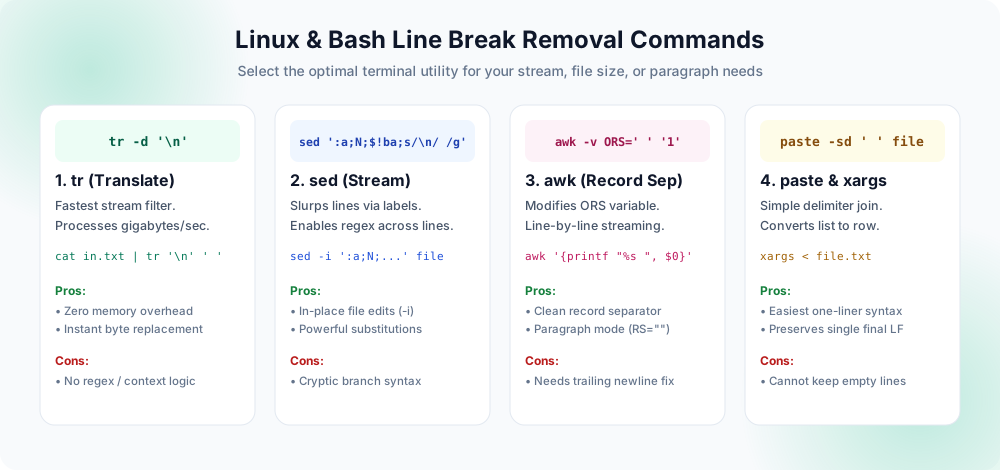
tr wins on raw throughput; sed enables pattern replacement; awk manages record separators; and paste provides clean tabular joining.Why Line Break Removal in Linux Is More Complex Than It Looks
In the Unix philosophy, text streams are organized as lines separated by an ASCII 0x0A Line Feed (\n). But when you try to remove them, standard expectations quickly collide with how core utilities buffer data.
Nearly every programmer who opens a terminal has tried typing sed 's/\n//g' filename, only to watch the tool spit out the exact same text completely untouched. Why does that happen? Because standard Unix line processors — including sed and grep — read input into memory one line at a time, strip the newline delimiter before processing, run their rules, and then re-append a newline character when writing to standard output. The newline character is literally invisible to the pattern matcher during normal execution.
Furthermore, text arriving from external environments introduces encoding and carriage return complications. Text copied from a Windows server, an email client, or an uploaded CSV often carries CRLF (\r\n, byte sequence 0x0D 0x0A). If you strip the newline (\n) but leave the carriage return (\r), terminal outputs overwrite themselves, JSON parsers fail, and database imports crash with mysterious control character errors.
To clean your data cleanly, you need to understand four distinct dimensions:
- Character Deletion vs. Replacement: Do you want words glued together (
word1word2) or separated by a clean single space (word1 word2)? - Paragraph Boundary Preservation: Are you flattening an entire document into a single line, or joining soft wraps inside paragraphs while retaining double blank lines?
- Memory Footprint & Stream Processing: Can the utility process a 20 GB log file in a stream, or will it attempt to slurp the entire file into RAM and trigger the Linux kernel Out-Of-Memory (OOM) killer?
- Cross-Platform Carriage Returns: Does the file contain hidden Windows
\rbytes that require sanitization alongside Unix\n?
tr (Translate)
Best for raw character-by-character translation and deletion in shell pipelines. Processes 2+ GB/sec with near zero CPU overhead.
tr '\n' ' ' < input.txtsed (Stream Editor)
Ideal for in-place file modifications (sed -i) and regex pattern matching when using buffer branching loops.
sed -i ':a;N;$!ba;s/\n/ /g' f.txtawk (Record Pattern)
Unbeatable for smart paragraph mode where double newlines define records and single newlines represent inner wrapped prose.
awk -v RS='' -v ORS='\n\n' ...paste & xargs
The cleanest terminal one-liners to serialize a list of IDs, filenames, or tokens into a single space-separated line.
paste -sd ' ' input.txt1. The tr Command: Maximum Speed Stream Translation
When your goal is purely to strip or substitute newline characters across a stream without needing conditional regex logic, tr (translate) is your best friend. Written in optimized C and part of GNU Coreutils, tr does not build complex syntax trees or parse grammar. It reads raw bytes from stdin and writes transformed bytes directly to stdout.
Deleting Line Breaks Completely
If you have a base64 string, an encrypted key, or an unbroken hash that was accidentally split across 80-character lines, you want to remove the newlines entirely without inserting spaces:
# Remove all Unix LF line breaks (leaves no spaces between words)
tr -d '\n' < broken_key.txt > clean_key.txt

# Remove both Windows CRLF (\r and \n) safely
tr -d '\r\n' < windows_dump.txt > clean_single_line.txt
Replacing Line Breaks with Spaces
When dealing with sentences, paragraphs, or lists of names, deleting newlines directly causes the last word of line 1 to collide with the first word of line 2 (e.g., "hellothere" instead of "hello there"). Use tr to translate every newline into a standard space:
# Replace every newline with a single space
tr '\n' ' ' < multiline_paragraph.txt > single_line.txt

# Pipe from curl or cat directly
cat server_logs.txt | tr '\n' ' ' | grep "ERROR"
tr utility only reads from standard input; it cannot take a file name as a direct argument. You must use shell redirection (< file.txt) or a pipe (cat file.txt | tr ...). Furthermore, tr '\n' ' ' replaces every newline, meaning consecutive blank lines become multiple spaces, and the file will lack a final trailing newline on exit.2. The sed Command: In-Place Editing & Multi-Line Pattern Buffers
The stream editor sed is installed on virtually every Linux distribution and macOS installation. While its default behavior prevents single-line matching of newlines, its branching instructions allow you to build an accumulator that loads the entire file into its pattern space before applying a global substitution.
The Classic sed Accumulator Loop Explained
Here is the standard POSIX-compliant sed command used by system administrators to replace all newlines with spaces:
sed ':a;N;$!ba;s/\n/ /g' input.txt > output.txt
Let us dissect why this specific command works when s/\n/ /g fails on its own:
:acreates a label namedain the script execution flow.Nappends the next line of input into the pattern space, preserving the embedded newline character between the current line and the next.$!bachecks if the parser has reached the last line ($). If not at the last line ($!), it branches (b) back to labela. This loops continuously until the entire document resides in a single unified pattern space.s/\n/ /gruns once the loop completes, replacing every embedded newline character with a single space.
In-Place File Replacement
One major advantage of sed over tr is its ability to edit files in-place without manual temporary file creation:
# In-place edit on Linux (GNU sed)
sed -i ':a;N;$!ba;s/\n/ /g' config_list.txt

# In-place edit on macOS / BSD sed (requires empty extension string)
sed -i '' ':a;N;$!ba;s/\n/ /g' config_list.txt
:a;N;$!ba loop accumulates the entire file into RAM before executing the replacement, running this command on a 5 GB file will consume over 5 GB of system memory. For files larger than 100 MB, use awk or tr instead.3. The awk Command: Record Separators & Paragraph Awareness
awk is designed around the concept of records and fields. By default, records are separated by newlines, but you can override both the Input Record Separator (RS) and the Output Record Separator (ORS) to achieve elegant newline transformations with minimal code.
Method A: Modifying the Output Record Separator (ORS)
To join all lines with a space while streaming line-by-line (which uses virtually zero memory):
# Replaces every newline with a space
awk -v ORS=' ' '1' input.txt > output.txt

# Replaces every newline with a comma and space (ideal for CSV lists)
awk -v ORS=', ' '1' ids.txt > csv_row.txt
In this command, -v ORS=' ' changes the string printed after every record from a newline to a space, and the trailing '1' is idiomatic awk for "print the current record without modification."
Method B: Preserving Paragraphs (The Paragraph Mode)
What if you copied text from a PDF, an academic thesis, or an email, where soft wraps need to be joined, but genuine blank lines between paragraphs must remain untouched? Setting RS="" puts awk into special paragraph mode:
# Preserves double blank lines between paragraphs while joining single line breaks
awk -v RS="" -v ORS="\n\n" '{gsub(/\n/, " "); print}' article.txt > cleaned_article.txt
In this mode, any sequence of two or more blank lines is treated as a record boundary. Within each record (paragraph), gsub(/\n/, " ") replaces internal single line breaks with spaces. The output is then followed by \n\n, restoring the visual paragraph structure. This is equivalent to our web-based Preserve Paragraphs tool, executed natively inside your Linux shell.
4. paste & xargs: The Cleanest One-Liners
If you have a file containing a list of server hostnames, user IDs, or Git commit hashes, you usually want to serialize them into a single horizontal line for an argument list or shell variable. Writing loops or complex regex is overkill when paste or xargs is available.
Using paste for Serial Delimiting
The paste utility merges lines of files. With the -s (serial) and -d (delimiter) flags, it collapses all lines into a single row using whatever delimiter character you specify:
# Join lines with a single space
paste -sd " " servers.txt

# Join lines with a comma (perfect for SQL IN clauses: 'id1,id2,id3')
paste -sd "," ids.txt

# Join lines with no delimiter at all (glues characters together)
paste -sd "" chunks.txt
Using xargs for Command Argument Flattening
Because xargs natively splits on whitespace and newlines, feeding a file to xargs automatically outputs all tokens separated by single spaces on a single line:
# Flattens all lines into space-separated items
xargs < wordlist.txt

# Capture into an environment variable
HOSTS=$(xargs < hosts.txt)
echo "Deploying to: $HOSTS"
5. Perl One-Liners: Full Regex Power with Slurp Mode
When standard POSIX utilities hit their limit — for instance, when dealing with complex lookaround assertions, Unicode normalization, or variable CRLF sequences — Perl one-liners provide battle-tested reliability without compiling external binaries.
# Replace all newlines with spaces across a file in-place
perl -i -pe 's/\r?\n/ /g' document.txt

# Slurp mode (-0777): loads the whole file and replaces single newlines while keeping \n\n
perl -0777 -pe 's/(?<!\n)\n(?!\n)/ /g' report.txt > cleaned_report.txt
The -0777 switch instructs Perl to read the entire file as a single scalar string (slurp mode). The negative lookbehind (?<!\n) and negative lookahead (?!\n) ensure that only lonely single newlines are matched. If two or more newlines exist together, the regex skips them, preserving intentional paragraph separation.
Linux Tool Performance & Feature Matrix
To help you select the exact command for your script or automated pipeline, the following table summarizes memory behavior, maximum speed, and feature capabilities:
| Tool & Command | Throughput | RAM Usage | Paragraph-Safe? | Best Use Case |
|---|---|---|---|---|
| tr '\n' ' ' | ~2,500 MB/s | Minimal (<1 MB) | No | Massive log files & fast streams |
| sed ':a;N;$!ba;s/\n/ /g' | ~120 MB/s | High (100% of file) | With custom regex | In-place updates on small/medium files |
| awk -v RS="" ... | ~350 MB/s | Low (per paragraph) | Yes (Native) | Prose, book manuscripts, PDF text |
| paste -sd " " | ~1,800 MB/s | Minimal (<1 MB) | No | Converting lists/columns to single row |
| perl -0777 -pe ... | ~280 MB/s | High (Slurps file) | Yes (Lookaround) | Complex cross-platform regex cleanups |
Real-World Automation Recipes
Cleaning Multiline JSON or Base64 in Bash Pipelines
When fetching OAuth tokens or SSH keys via API or curl, responses often include unwanted breaks:
# Strip formatting newlines from a public SSH key
TOKEN=$(curl -s https://api.example.com/v1/token | tr -d '\r\n')
echo "Clean Bearer: $TOKEN"
Batch Cleaning Multiple Files in a Directory
If you have a directory of raw text files exported from a document management system, loop through them using a safe Bash subshell:
# Clean every .txt file in the current directory and save to clean/
mkdir -p clean_output
for file in *.txt; do
  [ -f "$file" ] || continue
  awk -v RS="" -v ORS="\n\n" '{gsub(/\n/, " "); print}' "$file" > "clean_output/$file"
done
echo "Batch processing finished successfully."
Pre-Execution Checklist
- Character Encoding Verified: Check if your file uses Windows
CRLFline endings withfile input.txt. If it returnswith CRLF line terminators, usetr -d '\r'ordos2unixfirst. - File Size Checked: If the file exceeds 500 MB, avoid
sed ':a;N;...'andperl -0777to prevent memory thrashing. Stick totror streamingawk. - Spacing Intent Confirmed: Determine whether you want words merged with no space (
tr -d '\n') or joined with spaces (tr '\n' ' '). - Paragraph Structure Evaluated: If the document contains multi-paragraph prose, use
awk -v RS=""or our Preserve Paragraphs tool rather than blind global replacement. - Original File Backed Up: When using in-place flags (
-i), always make a copy first (e.g.sed -i.bak ...).
Frequently Asked Questions
What is the fastest command to remove line breaks in Linux?
tr -d '\n' < input.txt > output.txt (or tr '\n' ' ' to replace breaks with spaces). tr operates at the byte level with zero grammar overhead, processing over 2 GB per second on standard SSD drives.Why does standard 'sed s/\n//g' fail to remove line breaks?
sed reads input line-by-line, strips the trailing newline character before placing the line into its pattern space, executes commands, and automatically appends a newline when printing. Because the newline character is never present inside the pattern space during normal line processing, s/\n// finds no match. You must use an accumulator loop like :a;N;$!ba;s/\n/ /g to hold newlines in memory.How can I remove line breaks while keeping paragraph breaks in Linux?
awk in paragraph mode: awk -v RS="" -v ORS="\n\n" '{gsub(/\n/, " "); print}' input.txt. This automatically treats blank lines as paragraph delimiters, flattening internal line wraps to spaces while preserving paragraph gaps.How do I remove CRLF (\r\n) carriage returns in Bash?
tr -d '\r' < win.txt > unix.txt to convert Windows CRLF to standard Unix LF, or run dos2unix file.txt. To remove both newlines and carriage returns simultaneously, run tr -d '\r\n' < file.txt.What is the simplest one-liner to join lines with spaces?
paste -sd " " file.txt or xargs < file.txt. Both utilities convert multi-line lists into a single space-delimited line and ensure that a single final newline remains at the end of the file.How do I edit a file in-place to remove line breaks?
sed -i ':a;N;$!ba;s/\n/ /g' file.txt on Linux (GNU sed), or perl -i -pe 's/\r?\n/ /g' file.txt on any system. On macOS, use sed -i '' ':a;N;$!ba;s/\n/ /g' file.txt.Explore Related Tools & Tutorials
PowerShell Line Breaks →
The Windows administrator counterpart: -replace, .Replace(), and regex patterns.
ProgrammingPython Line Break Methods →
Build automated data cleanup scripts using splitlines(), re.sub(), and pandas.
DatabasesSQL Newline Cleanup →
Clean CHAR(10) and CHAR(13) from database records across MySQL, Postgres, and MSSQL.
Online ToolReplace with Space Tool →
Instant browser-based line break removal without opening a terminal window.
Terminal & GUISublime Text & Vim / Neovim →
Join lines interactively using Vim keybindings (J, gJ) or Sublime shortcuts.
ConfigurationYAML Multiline Strings →
Manage folded and literal blocks cleanly in bash scripting and server configs.